Budget Goals
Zerosum goals pair a frequency with a behavior: Budget another, Refill up to, or Reach a balance, from weekly to yearly, by a date, or open-ended.
Written By Pedro
Last updated 6 days ago
A goal tells Zerosum what a category is trying to do, then shows what needs money in the month you're viewing. Building one takes two picks: a frequency (how often the category needs money) and a behavior (how the goal counts that money).
How goals work
Add a goal from any category's detail panel. A category has one goal. Pick a frequency first:
Weekly and biweekly: pick a weekday; the goal follows every week or every other week.
Monthly: the calendar month is the period.
Yearly: a twelve-month cycle ending in the due month you pick. The first cycle runs from the month you create the goal, so it can be shorter.
By date: a specific day, optionally repeating every 1 to 11 months or every 1 to 5 years.
Open-ended: no date and no monthly ask. It tracks progress toward the target and offers a manual Budget action instead of automatic goal funding.
The three behaviors
Budget another: counts what you budget, not what you spend. Pick this for money you plan to spend along the way, like a trip.
Refill up to: tops the category back up to a target each period. Spending never raises this period's ask; leftover money lowers the next one.
Reach a balance: tracks the live category balance, so spending raises the ask right away. Works toward a date or with no deadline at all.
Not every pairing exists. Each frequency offers only the behaviors that make sense for it:
ℹ️ Switching frequency resets the behavior: each frequency opens on its default behavior, and changing the frequency resets to that default. The amount you typed stays, so double-check the behavior after a switch.
ℹ️ Credit card payment categories: a card's Payment category accepts two shapes: a fixed monthly payment goal, or a pay off by date goal that reads the card's live balance and works out each month's amount for you. Neither asks for more than what's left to pay, and both rest when the card is paid off. See how payment goals work.
Common setups
Rent: Budget another $1,500 each month
Groceries: Refill up to $600 each month
Car insurance: Refill up to $900 by August 15, repeats yearly
Emergency fund: Reach a balance of $10,000, no deadline
💡 Tip: once goals are set, pick Underbudgeted in auto-budget to cover overspending, fund goals that have an ask for the month, then cover upcoming bills in one pass. Open-ended goals have no monthly ask, so Underbudgeted does not fund their target gap (it may still cover separate overspending or upcoming bills in the category). Use Budget on an open-ended goal card or desktop goal peek when you want to fund the remaining balance manually.
Budget another
Budget another asks for the same amount each period and counts only what you budget. Spending, refunds, and the category balance never change the ask, which keeps the goal steady for money you spend as you save it. Good for rent, subscriptions, investment contributions, and trips you pay for along the way.
Weekly and biweekly goals ask per occurrence, so a month with five Fridays asks five times. Yearly and dated goals treat the amount as the cycle total and spread it across the months left until the due date; budget less than a month's slice and the remaining months absorb the difference.
Add Stop at a balance to stop asking once the category holds that much, counting what carried in plus what you budgeted. It suits routines you don't want to hoard for: keep budgeting $100 a month for car maintenance, then stop once the category holds $2,000. Money above the cap counts as overbudgeted, so auto-budget can offer it back.
Refill up to
Refill up to restores the category to a target balance each period. The period's funding is what it started with plus what you budget during it, so money already sitting in the category counts before Zerosum asks for more. Good for groceries, fuel, dining out, car repairs, and any buffer you spend from and top back up.
Spending never raises this period's ask. A mid-period purchase lowers the next period's starting balance instead, so the next ask grows to refill the gap.
Weekly and biweekly goals build the month's target from the amount times the number of occurrences, and leftover money covers the earliest weeks first. Yearly and dated goals refill by each due date: the cycle starts with whatever carried into its first month, and Zerosum spreads the rest across the months until the date.
On weekly, biweekly, and monthly goals, add a Monthly funding cap to limit how much any one month asks. After a heavy spending month the re-ask spreads across several months instead of landing at once; a cap below the target just rolls the shortfall forward.
ℹ️ Funded is not Achieved: a yearly or dated goal whose cycle started with the full target stays Funded after that money is spent. The fill promise for this cycle is met, but the live balance is lower, so the card shows both. It only reads Achieved while the balance actually holds the target, and the next cycle asks again.
Example: Car repairs, refill up to $600 monthly. June starts with $450 left over, so June asks for $150. A $300 repair mid-June changes nothing; July starts with $300 and asks for $300.
Reach a balance
Reach a balance watches the live category balance, the same Available number you spend from. Spending raises the ask right away, and a refund lowers it. Good for an emergency fund, a house down payment, or any one-time purchase you save up for before spending.
With a due date, Zerosum spreads the remaining amount across the months left and recalculates every time the balance moves. Without one, the goal is open-ended: it shows progress and reads Achieved at the target, but never asks for a monthly amount or appears as a goal-funding reason in Underbudgeted. Use Budget on its goal card or desktop goal peek to add the full gap between Available and the target whenever you choose. If Available is negative, the action first covers that overspending and then funds the target.
Reach a balance never repeats. After the due month, a met goal stays Achieved, and a missed one keeps asking for the shortfall until you budget it, edit the goal, or delete it.
When goals ask for money
Monthly, weekly, and biweekly goals carry a timing label so you can scan what needs attention first. The labels are for planning, not late fees.
Monthly: add a due-day label like "by the 17th" so bills read in order in the budget table and calendar. The label is cosmetic and never changes the ask. In a shorter month, last-day and 31st labels land on the actual last day.
Weekly: funds on the chosen weekday every week, so a month with five of them funds five times. When you create the goal, the editor previews the first month's funding dates and total.
Biweekly: runs every two weeks continuously on the weekday you pick, not on fixed dates, so some months show two funding dates and some show three. The first-or-second-week choice only sets which two-week period it starts from. When you create the goal, the editor previews each choice's first-month funding dates and total.
ℹ️ When a goal starts: a goal starts in the month you're viewing when you create it. To start one in a future month, move there first, then create it. Editing changes the amount, frequency, behavior, and due date, but not the start month; a biweekly goal's weekday and first-or-second-week are locked too, to preserve the rhythm. To move a start or re-phase after a pay change, delete the goal and create a new one in the month you want. Earlier months keep any money you already budgeted.
Where goals show up
Goal cards track global progress (how much of the total target you've saved). Everything else is scoped to the month you're viewing: what to budget, what you've spent, and any overspending. The two views answer different questions.
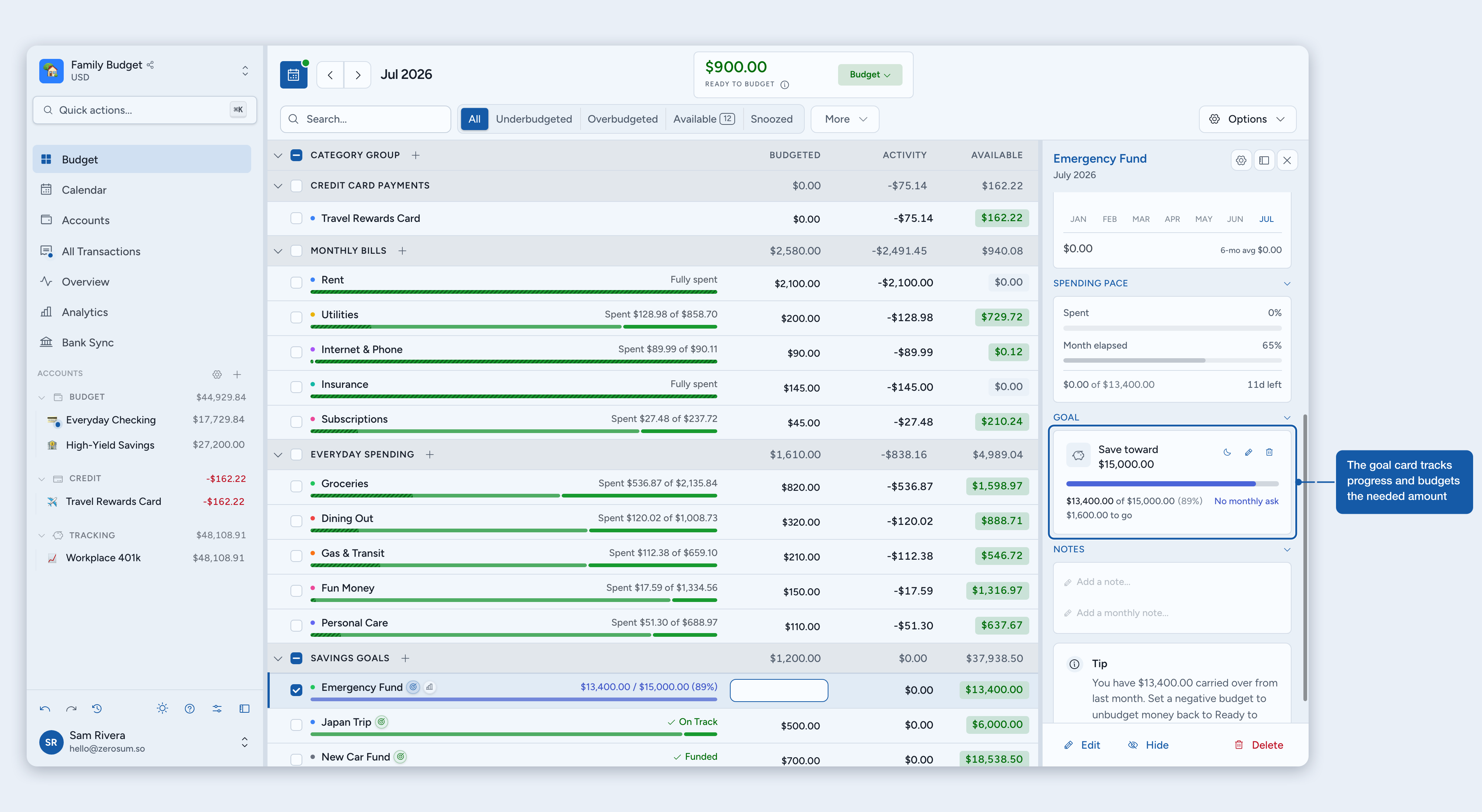
A goal can appear in five spots:
Goal status: the inline text under the category name (On Track, Need $X, Funded).
Goal card: side panel and overview, with global progress and a Budget button (it shows the amount, like "Budget $50"). On goals with a monthly ask, it budgets exactly what the viewed month needs. On open-ended goals, it budgets the full gap between Available and the target.
Goal peek: a quick popover from the goal icon in the row. On desktop the icon shows on hover or selection, so the table stays clean, and open-ended goals offer the same manual Budget action here. Categories without a goal show the same icon, so you can start one straight from the row.
Row bar: when the row's mode is Goal, Combined, or Split. How to read and customize it lives in Budgets & Categories.
Calendar: weekly and biweekly goals on their weekdays, monthly goals when more money is needed, yearly and dated goals as monthly plan prompts. They never count as income or spending. Open-ended goals have no date, so they stay off the calendar.
The month-by-month plan
Yearly and dated goals show a funding plan in the category side panel, so you can see how this month's amount fits the deadline.
Budget more than a month's slice and the later amounts shrink; budget less and they grow.
On a Reach a balance goal, spending grows the remaining amounts too, because the plan tracks the live balance. Budget another and Refill up to plans ignore mid-cycle spending.
The plan hides once the goal is funded or snoozed.
Snoozing
Snooze hides a goal's ask for the current month, handy when a refund or one-off adjustment means the category shouldn't ask for more right now. Use the moon button on a goal card, choose Snooze this month from the row's goal peek, or select one or more categories in the budget table and press Shift + S. With several categories selected, one press snoozes every eligible goal in the selection, and pressing again wakes them all. Open-ended goals cannot be snoozed because they never create a monthly ask: their snooze controls are hidden, Shift + S skips them, and they stay out of the Snoozed filter.
Snoozing wakes up automatically next month. Spending, overspending, and row activity still show normally. Auto-budget leaves a snoozed category alone in both directions: Underbudgeted doesn't fund it, Reduce overbudgeted doesn't flag it, and it stays out of Next Month Coverage.
Budgeting months ahead
When you budget a month ahead, goals that watch a balance ceiling (Refill up to goals, and Budget another goals with a Stop at cap) can ask for the full target or only the shortfall after the money likely to carry over. The Plan future months fresh setting in the edit-budget dialog decides which.
Plan fresh (default for new budgets): a future month asks for the full target and ignores the carryover, so you plan each month as if it started empty.
Carryover-aware (default for existing budgets): a future month subtracts the balance likely to carry over and asks only for the shortfall. The ask shifts as you spend beforehand.
Yearly and dated Refill up to goals plan in cycles, not single months, so the setting applies at the cycle boundary. Months inside an already-started cycle always use the real cycle-start seed, regardless of the setting. The setting affects only periods that begin after today.
ℹ️ Money carries forward either way: the setting never changes how much money moves between months. A positive balance always carries forward; only the timing differs. Plan fresh shows the extra as over-budgeted once that month is current, while carryover-aware nets it out ahead of time. The same logic drives the Next Month Coverage card.
Common questions
Do refunds count toward a goal?
Depends on the behavior. Budget another counts only what you budget, so a refund never changes the ask. Refill up to counts it next period, as part of the balance that carries in. Reach a balance counts it right away, because it tracks the live balance.
Why does my goal read Funded while the balance is low?
A Refill up to cycle that started with the full target keeps its promise even after you spend. The cycle is funded, the balance is spent, and the goal peek shows the real balance alongside.
Can I change a goal for a single month?
No. A goal has one setup, and editing changes it everywhere. For goals that create a monthly ask, snooze quiets the current month. Open-ended goals have no monthly ask and cannot be snoozed.
What if I budget less than a month's slice of a dated goal?
Nothing breaks. The remaining months absorb the difference, and the funding plan grows their amounts.
Why is a goal asking for more than its monthly amount?
Money was moved out of the category this month. The goal asks for it back on top of the month's amount, so one budget action puts you back on plan. This applies to every goal with a monthly ask, including a card's payment goal, where the side panel spells out how much of the ask is putting money back.