Zero-Based Budgeting
Learn what zero-based budgeting is and how Zerosum helps you give every dollar a job. A beginner's guide to ZBB.
Written By Pedro
Last updated 27 days ago
Zero-based budgeting gives every dollar of income a job before you spend it. Instead of looking back at where your money went, you decide where it goes in advance.
What is zero-based budgeting?
Zero-based budgeting (ZBB) budgets every dollar of income to a specific purpose before you spend it. The math is simple: Income − Budgeted = $0. Every dollar is accounted for, so nothing sits around undirected.
💡 Tip: Zero doesn't mean broke. A zero budget just means you've intentionally decided where every dollar goes, and savings is a perfectly valid job for your money.
The four principles
- Be intentional. Decide where your money goes in advance instead of wondering "where did it go?" at month-end.
- Stay flexible. Life changes, so move money between categories when it does. Your budget adapts to reality, not the other way around.
- Budget real money. Only budget money you have right now. Don't budget next week's paycheck until it arrives.
- Prioritize what matters. Pay essentials first (rent, food, utilities), then decide what to do with what remains.
Give every dollar a job
The core rule: every dollar must have a purpose. That purpose can be any of these:
- Bills and necessities: rent, utilities, insurance, groceries
- Savings goals: emergency fund, vacation, car down payment
- Debt payoff: student loans, car payments, payoff plans
- Fun and lifestyle: entertainment, hobbies, dining out
ℹ️ Note: Savings and fun money are both valid jobs. ZBB is about intentional choices, not deprivation.
Understanding "Ready to Budget"
Ready to Budget shows money that's waiting for a job. Your goal is to get this number to zero by budgeting all your money to categories. Click the info icon next to it at the top of your budget to open the Budget Calculation breakdown and see exactly how it's derived.
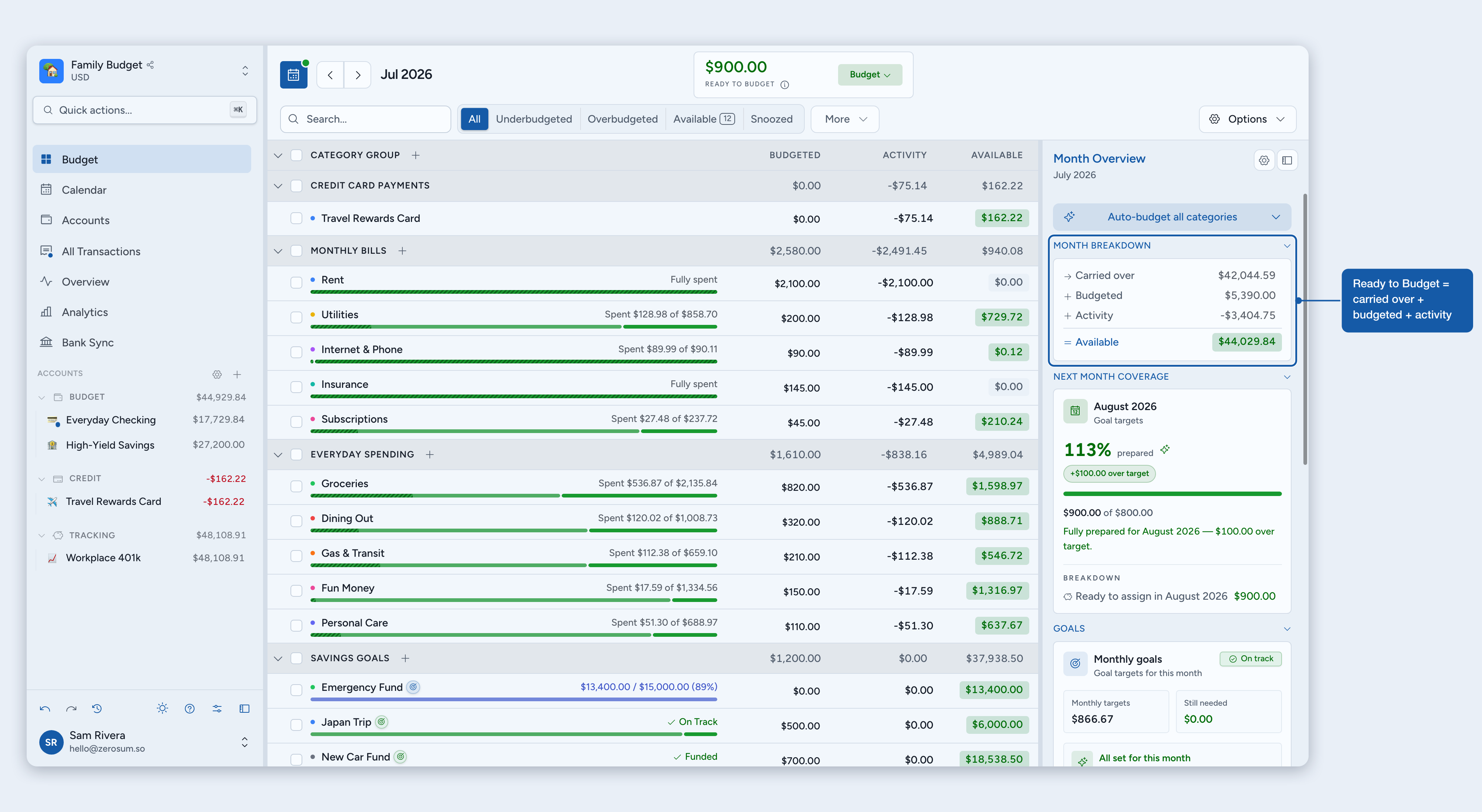
How it's calculated
The calculator shows the same number two ways. First, right now: what makes up the number today:
- + Budgetable money: cash plus any positive credit-card balances
- − Money in categories: everything currently budgeted (credit-card debt excluded)
- − Deferred to next month: For Next Month income you set aside
- − Committed to later months: if you budgeted ahead
Second, what changed since last month: the same number told as a month-over-month story:
- + Left over from last month
- + Income this month: all income received, including For Next Month
- + Saved from last month: if you deferred income last month
- − Budgeted this month
- − Overspent last month
- − Saved for next month: income you deferred with For Next Month
With credit cards, a Card credit change line can appear for credit that became (or stopped being) budgetable, such as overpaying a card. Credit-card debt never reduces Ready to Budget; it just stays on the card.
Where money comes in
- Starting balances when you set up accounts
- Income transactions categorized as Ready to Budget (paychecks, reimbursements, and so on)
- Money unbudgeted from categories or returned via auto-budget
What happens when you overspend
By default, a category you overspent with cash resets to zero next month, and the deficit reduces next month's Ready to Budget. The drag flows to your unbudgeted money rather than haunting the category.
Overspending a category you paid with a credit card is debt, not a cash shortfall. It stays on the card and never reduces Ready to Budget, this month or next. That's why the calculator leaves credit-card debt out of "Money in categories."
💡 Tip: Move money from another category to the overspent one within the same month and the drag never appears. You can also cover overspending retroactively by budgeting to the overspent category in a past month, which is neutral on your current Ready to Budget.
Prefer the deficit to stay on the category instead? Turn on Carry over negative balances in Budget settings.
Past months
The previous month keeps its real Ready to Budget, so you can keep budgeting there while you finish entering last month's transactions. Money you budget in the previous month reduces what carries into the current month.
Months older than that display $0. Any leftover has already rolled forward into a later month's cumulative Ready to Budget. You can still budget or move money in those months when needed; the confirmation uses the real amount that's still available, not the $0 banner. The breakdown for an older month also shows a "Rolled into {next month}" line, so you can see exactly what flowed forward.
Budgeting ahead and over-commitment
When you pre-fund categories in a future month, Zerosum counts that pre-funding against your current Ready to Budget, so you see what's actually still available to budget this month. If you commit more money to future months than you have, Ready to Budget goes negative: the signal that you're over-committed and need to unbudget from future months or wait for more income. The same math applies to every month from the current month forward.
ℹ️ Note: Deferring income with For Next Month doesn't pull money back to this month. That money belongs to next month, so budgeting it there isn't "budgeting ahead"; it's budgeting next month's own money, and this month stays at $0 rather than going negative.
Deferring income with For Next Month
Income categorized as For Next Month is still money you received this month, so it shows up in "Income this month" in the breakdown. A matching "Saved for next month" row moves that amount out of this month's Ready to Budget and over to next month's. For the full walkthrough, see For Next Month.
What the colors mean
- Green (positive): money waiting to be budgeted
- Gray (zero): every dollar has a job
- Red (negative): you've budgeted more than you have
⚠️ Warning: If Ready to Budget goes negative on the current month, select the Ready to Budget card and pick a category to cover the shortfall, or unbudget money from categories until it reaches zero or above.
Why it works
- Save more. Treat savings as a bill to yourself instead of a leftover.
- Less stress. Know exactly where every dollar goes, with no surprise overdrafts.
- Pay off debt faster. Intentionally allocate money to debt instead of paying the minimum.
- Spend guilt-free. When money is already budgeted for fun, you can spend it without second-guessing.